Showing posts with label android. Show all posts

Sunday, July 8, 2012

Nexus 7 Tablet: Mega Value for your money


Along with the revealing of Android 4.1 Jelly Bean, there was loads of other goodies that Google took time to share and discuss with its developers and users.

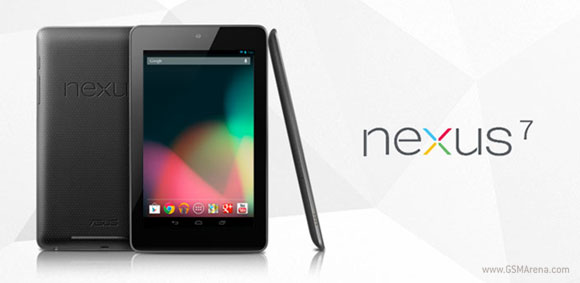
One of them that should not be missed is the unveiling of an awesome tablet, Google Nexus 7 Tablet.


This is one monster of a tablet for a fraction of the price you would have to pay for other tablets near similar specs. Not only that, this bad puppy will also run on 4.1 Jelly Bean, fully taking advantage of the latest updates.

All you have to pay for this great piece of technology is:

  • USD199 for 8GB (internal storage) version
  • USD 249 for 16GB  (internal storage) version

That would be like 700-800 Ringgit only! Take my money now!!!

Just try comparing this to the local tablet which a local maker is trying to sell for 999 Ringgit known as 1Malaysia Pad (click to view specs)


Here is a quick rundown on the specs for Google Nexus 7 Tablet:

  • 7 inch IPS display - 1280 x 800 pixels
  • 1.3GHz quad-core Tegra 3
  • 1GB Ram
  • 12 core ultra-low voltage Nvidia GeForce GPU
  • 8GB or 16GB internal storage
  • WiFi, Bluetooth & NFC (Google Wallet enabled)
  • No 3G model (yet, probably in the near future)
  • Front facing 1.2MP camera
  • No rear camera :(
  • Dimensions: 198.5 x 120 x 10.5 mm
  • Weigh - 340 grams
  • Battery - 4325 mAh 

How can someone not love all that sexiness squeezed into a 7 inch tablet for a couple of hundred bucks?

Promo video for the tablet:


Thursday, June 28, 2012

Time to have some Jelly Bean!


While were busy sleeping an all last nigh, Google I/O 2012 kicked off and revealed loads of goodies that will come in the near future. Google introduced it's latest sweet treat mobile OS, Android 4.1 Jelly Bean.


In a nutshell, Jelly Bean will offer Android users:

  • Framerate has been increased to 60 FPS
  • Vsync is enabled
  • Triple Buffering is enabled.
  • Text Input improvement
  • Voice Typing no longer requires network connection
  • Improved Voice search - time for Siri to hide?
  • Resizeable Widgets - finally, I have been waiting for so long...
  • Improvement to predictive keyboard
  • 18 new input languages
  • Improved CPU utilization - faster is better!
  • Improved Accessibility for the blind
  • Camera App update - pinch to view in film strip
  • Android Beam update- Video sharing via NFC and NFC pairing by just bumping with NFC enabled device
  • Notifications update - now able to make phone calls, view multiple emails, able to expand apps all within the notification shade overlay
  • Revamped mobile search
  • Google Now - gives you search result information at the right time.
    • eg. map/direction searches gives you directions now with how much time to get there, estimated arrival time, etc.

4.1 update will be pushed to some devices like Galaxy Nexus, Nexus S by mid July 2012, so expect it to hit the rest of the newer devices running on ICS after that.

Just some numbers from Google boasting about Android; 1 million Android users are activated everyday up from 400,000.


Thursday, June 7, 2012

Tweaking that Android device.


Finally decided to ditch that iPhone for an Android and want to get the best out of that smartphone running on Android OS or just frustrated over the "complexity" involved in tweaking your Android phone to run like a well oiled machine?

What ever it may be, getting an Android to function at its optimum capability does require some under the hood tweaks and tricks. Of course most smartphones or devices running on Android are great to use right out of the box, but a minor changes to its setting will go a long way in making you truly enjoy your device.

Users migrating from iPhone will generally be cursing on the complexity of an Android as Apple has made the iPhone regulate memory & apps very well on its own, making it simple to manage which is why there are still so many Apple fans. I do not blame the fans for liking simplicity but I for one prefers power and the freedom to manage it which can be found in using an Android.


To start it off, I have compiled a list of things that can be done in order to make your Android device purr like cat.

(Most of the tweaks below can be found under SETTINGS in your Android device unless stated otherwise)

  • Manage your Display to get maximum eye candy without sacrificing battery life
    • Adjust the Brightness of your screen (Settings > Display) by lowering it to reduce power consumption (raising it will of course drain more power).
    • Turning on Auto Adjust Screen Brightness is a double edged sword as you let the phone decide on screen brightness based on the environment it is being used. In darker / low light places, the brightness will be jacked to near maximum to compensate, so be wary.
    • With the Screen Timeout setting, you can set the time before you want your phone screen to dim out and turn off in order to save power. This helps to automatically turn off the screen quicker when no in use (if you did not manually click the power button to turn it off already). My suggestion is 30 seconds (1 minute if you must) before timeout as 15 barely lets you read anything before it timeouts.
      • Tip: Using a 100% plain black coloured wallpaper/home screen/unlock screen does help to reduce power consumption.
      • Instead of dimming itself to very low lightning in LCD, LED is able to off itself producing black colored darkness (light-less-ness), using less to no power at all on the black areas of the screen.
      • Proven scientifically HERE 
      • You can easily create a black background with MS paint.

  • Wireless Connections and Data Packages
    • You would be surprised how much battery wireless connection actually takes up from your phone.
    • A smartphone with Data Package and Wifi turned off, can run almost a week before needing to recharge.
    • Before you just leave Wifi permanently on (many do this to save on their data package) and this causes it to drain more battery everytime it is attempting to search for a another accessible Wifi network.
    • If you know you are in a place with low or no Mobile Network or Wifi connection, make sure to deactivate your data network. This is because the antenna will use additional power each time it is attempting to search and connect to a network.
    • Optionally, switch to Air Plane mode to off all wireless functions if you don't need a connection.
    • Make sure to off Wifi tethering when done as it uses a lot of power and generates a good amount of heat too as it turns your phone into a mobile router.
    • GPS, Bluetooth, NFC, S-Beam (Samsung only), etc are all wireless devices, so make sure to turn them off when not in use.

  • You though Vibration function saves power?
    • Only turn off the volume and vibrate on if you really need silence.
    • Everytime the motor vibrates, it consumes power.
    • Consider lowering your volume to the lowest possible and choosing a soft tone

  • Sync-ing
    • Your phone by default turns on Sync function which syncs apps online to get updates constantly or in a set time.
    • This uses data each time and power too.
    • So consider turning off sync and only turning it back on when you require it (eg. Play Store)
    • Most applications come with a refresh function or button which you can use to cause it to refresh right then and there instead of constantly.

  • Close Applications when not in use
    • Most applications close when you exit from the app or with the back / home button.
    • But some applications might linger in the background or remain partially running in the background when closed with the back button.
    • Make sure to head to Settings>Applications>Active/Running Applications and close any apps hiding in the background that you are no longer using.
      • Be careful not to close apps that you are not sure off as it may be needed by the phone and is part of the operating systems (prompt will appear if it is a key function).
      • Restarting (or turning off then on) your phone will just restore any function, so don't worry if you closed something important.

  • Keep your Wallpapar dead...
    • Yes, it looks cute and cool to have a live wallpaper with objects moving around, snowing, glowing and pulsating.
    • If you don't mind sacrificing a good 10% of your battery to it, then keep it on.
    • But if you want to get more juice (processing and battery) out of your phone, please remove that dancing chicken wallpaper.

To sum it up shortly
  • Set screen brightness
  • Control and manage wireless connections
  • Know when to turn off/on your wireless connections
  • Vibrate only if you need to
  • Kill apps running in the background
  • Consider a plain black wallpaper (or at least non animated)
    • Do NOT try plain White or bright colors as it consumes even more battery (white = 5x more)


Next, I will try to write on some cool applications that would compliment any Android device like how bacon goes with everything.